 Roy's AI Lab
Design the Problem Before You Choose the Stack
How to turn a vague request into a clear plan you can defend in an interview
25 October 2026 · Ritesh Rai
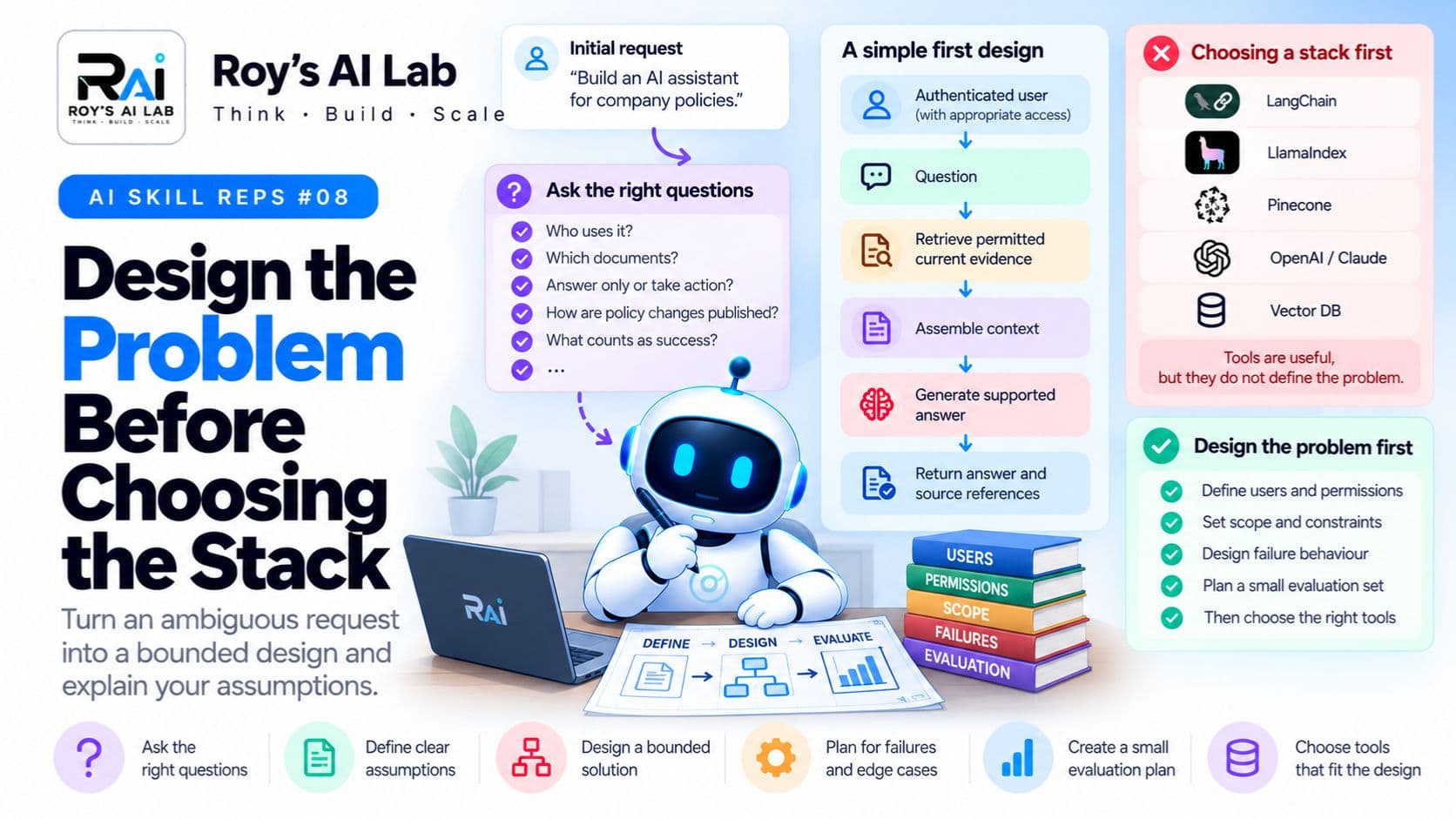
Quick answer
- Clarify the users, the permissions and whether the assistant can act before you choose any tools.
- Start with the simplest bounded workflow that meets the requirement, and add complexity only when you need it.
- Define how the system should fail, and write a small test set, before you build anything.
Someone asks you to "build an AI assistant for company policies." Your mind jumps straight to tools. Which vector database? Which framework? Which model?
Stop there. Those are the last decisions, not the first.
The people who build useful systems spend more time on the problem than on the stack. They ask questions, make assumptions visible, and decide what "good" means before anyone writes code. That habit also makes for much stronger interview answers.
Why read this? Because almost every AI project starts as a vague request, and the way you handle that first conversation decides whether the project succeeds. It's also one of the most common interview scenarios.
Your starting request
Here's the request again:
"Build an AI assistant for company policies."
Before reading on, write down five questions you would ask the person who made this request.
Take a minute. Write them down. Then compare your list with the one below.
Questions worth asking
Here are the questions that matter most:
- Who uses it? Employees, managers, HR staff, or customers?
- Which documents can each user access? Are some policies restricted?
- Does it only answer, or does it perform actions? Can it change anything?
- How are policy changes published? Is there one official source, or several?
- What counts as a successful answer? Who decides, and how?
- What should happen when the evidence is missing? Should it guess, or say it doesn't know?
- What latency and cost limits matter? Is it a quick chat, or an overnight report?
You don't need to ask all seven at once. Start with the ones that change the design. Permissions and actions usually change it the most.
Assumptions make the work visible
Real projects rarely have complete answers at the start. So the next best step is to write down your assumptions, clearly labelled, so everyone can challenge them.
For this teaching exercise, assume:
- Employees ask policy questions.
- The assistant is read only. It cannot change anything.
- It uses approved, current policy documents.
- It must respect document access restrictions.
- Answers should point to their supporting sources.
- When the evidence is missing, the assistant says so.
These are fictional requirements, not a claim about any real product. The point is that they're written down, so a stakeholder can say, "No, that's wrong," before anyone builds the wrong thing.
A simple first design
Here's a basic flow that fits those assumptions:
Authenticated user
       ↓
Question
       ↓
Retrieve permitted, current evidence
       ↓
Assemble the context
       ↓
Generate a supported answer
       ↓
Return the answer with source references
This diagram doesn't name a vendor or framework. That's deliberate. It shows the stages you need to make decisions about. The tools come after.
If you want to see how this kind of pipeline works in more detail, our RAG explained guide walks through the same stages in plain English.
Explain one choice
Why start with a fixed workflow instead of an agent that decides its own steps?
Because the main stages are already known. The question comes in, evidence is retrieved, an answer is written. You haven't yet found a need for the system to choose its own tools or plan its own investigations.
If the requirements change later, and the assistant needs to investigate open-ended problems across several systems, then reconsider. Our post on whether you need multiple agents explains how to make that call.
Define failure behaviour
Good design plans for things going wrong. For this assistant, decide in advance:
- No relevant evidence: the assistant explains that the available information isn't enough to answer.
- Conflicting policy versions: it doesn't quietly pick one. Your team needs a rule, such as "use the latest approved version, and show the date."
- The document service is down: it reports the failure, or follows an agreed recovery path.
- An unauthorised source appears in the search: it doesn't use it, even if the search can find it.
That last one is easy to miss. Being searchable doesn't mean being allowed. Access rules have to be enforced in the retrieval step, not just hoped for.
Add a small test plan
You need a starting set of test cases before you build. Include at least:
- A question the documents can answer.
- A question outside the documents.
- A question where the policy changed recently.
- A user who doesn't have access to a relevant document.
- A question built on a wrong assumption, such as "Since we offer free returns on all items...".
- A simulated service failure.
For each case, write down the behaviour you expect. Then you can check the system against it.
This is a starting point, not proof that the system is reliable. But it means you know what "working" looks like before you build. Our RAG evaluation guide explains how to measure answer quality once you have a working version.
The interview summary
Here's a clear way to answer a design question out loud:
"First I'd clarify the users, the permissions and whether the assistant can take any actions. Under those assumptions, I'd start with a read-only retrieval workflow, because the stages are known. I'd define what happens when evidence is missing, then test representative cases. If the requirements change, I'd revisit whether more autonomy is needed."
Then explain your trade-offs. Why this design, what it gives up, and what would make you change your mind.
Pause and think
A new requirement arrives: "The assistant must update employee records."
What changes?
Pause before reading on.
The answer: almost everything. A read-only assistant is not the same design with one extra tool added. A system that can write needs:
- Stricter permissions, so a user can only change records they're allowed to change.
- User approval before the change is made, shown with enough detail for a real decision.
- Input validation, so bad or ambiguous values are rejected before they reach the system.
- Clear action status, so everyone can see whether a change succeeded, failed or is pending.
- An audit trail, so you can see who asked for what, and when.
- A recovery plan, so a wrong change can be reversed.
Our post on why an agent shouldn't obey every instruction it reads covers the permission and approval side in more depth.
A quick checklist
Before you choose any tools, ask yourself:
- Do I know who uses the system and what each person can access?
- Do I know whether it only answers, or can act?
- Have I written my assumptions down?
- Have I defined what happens when evidence is missing or a service fails?
- Do I have a starting set of test cases?
If you can't answer yes to all five, you're not ready to choose a stack yet. That's the most useful thing this exercise can tell you.
A note on limits
This is a practice framework, not a universal interview rubric. Real projects have constraints this post doesn't cover, such as legal requirements, budgets and existing systems. The requirements and example are fictional.
Keep learning
Want to practise this kind of reasoning?
- Free RAG practice sets: https://roy-s-ai-lab.vercel.app/topics/rag. Every answer comes with an explanation.
- Free AI agent interview answers: https://roy-s-ai-lab.vercel.app/interview-qa/AI%20Agents
- Designing clear tool interfaces: https://roy-s-ai-lab.vercel.app/blog/your-agent-tool-interface-is-a-contract
- Full guides and scenario packs: https://roy-s-ai-lab.vercel.app/products
Try this: pick any AI project idea you have. Write the five questions you'd ask before choosing a tool, then answer them out loud in under two minutes.
Sources
- Anthropic, "Building effective agents": https://www.anthropic.com/engineering/building-effective-agents
- OpenAI, "Evaluation best practices": https://developers.openai.com/api/docs/guides/evaluation-best-practices
The requirements, architecture exercise and interview framework are original teaching recommendations.
Ritesh Rai
Keep reading
Read these next
- AI ApplicationsHow Fortune 500 Companies Actually Use Machine LearningReal-world AI applications behind the world's biggest companiesRead
- AI AgentsStored Is Not the Same as Remembered: How AI Agents Keep TrackMemory, task state and context explained, and why your agent sometimes forgets what mattersRead
- AI AgentsBefore You Change the Prompt, Read the Agent TraceHow to debug an AI agent by following what it actually did, step by stepRead