 Roy's AI Lab
Your Agent's Tool Interface Is a Contract
A simple guide to designing tool interfaces your agent can actually use
24 October 2026 · Ritesh Rai
Quick answer
- Agents choose tools by reading their names and descriptions, so make both clear.
- Validate inputs in code, and return results that help the agent's next decision.
- Test the design on real tasks, not only by reading it.
When an agent calls the wrong tool or misreads a result, it's tempting to blame the model. Often the real problem is the interface.
A tool is more than a function name. Its description, inputs, outputs and error messages all shape what the agent does next. Think of them as a contract between the agent and the system it acts on.
This guide is for AI engineers who build or review agents. By the end, you should be able to look at a tool interface and ask:
- Can the agent tell this tool apart from the others?
- Are the required inputs clear?
- Does the result support the next decision?
- Can failures be interpreted?
- How would we test an improvement?
"Contract" is a practical way to think about it, not a formal standard.
1. The core picture
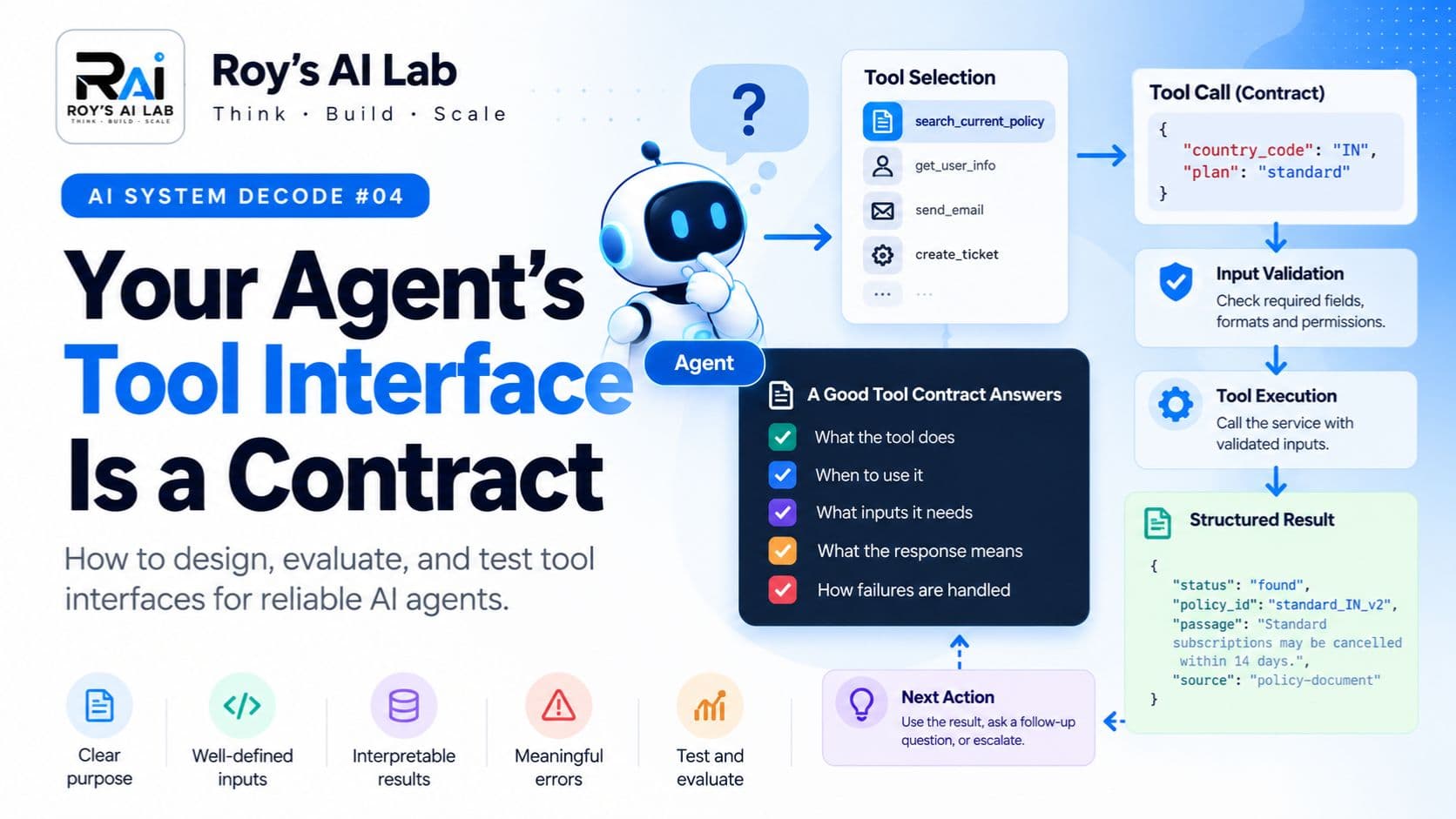
A tool interface tells the agent what the action does, when to use it, what information it needs, and what the response means.
The model may propose a call, but the surrounding system has to validate and execute it. A useful tool isn't just an API endpoint exposed to a model. Its interface needs to fit the tasks the agent is expected to do.
2. Five things worth understanding
One: names should help with selection
Compare these two:
lookup(value)

search_current_policy(country, plan)
The second name communicates a narrower purpose. That doesn't prove it will perform better, but it gives you a clearer design to test.
Also look at the whole tool set. Several overlapping tools can stay confusing even when each description sounds reasonable on its own.
Two: inputs should make intent explicit
Document the things an agent needs to get right:
- Required fields.
- Accepted formats.
- Allowed values, where that applies.
- Important assumptions.
- What should happen when information is missing.
Don't make the model guess an undocumented identifier format. And validate inputs in code, because a description alone doesn't enforce a schema.
Three: results should support the next decision
A successful call can still return an unhelpful result. Ask yourself whether the response contains what the agent needs to continue.
For a policy search, useful fields might include the relevant passage, its source, the scope it applies to, and the policy version or effective date where available.
Return enough evidence to interpret the result, not every field the service happens to store.
Four: errors should help recovery
"No matching policy" and "service unavailable" are different situations. The first may need a different query or some missing user information. The second may need a recovery path.
Clear error categories help the surrounding system handle failures properly. They are design choices you make for your application, not a universal standard.
Five: evaluate behaviour, not just wording
A revised description can sound clearer without improving outcomes. Test whether the agent:
- Selects the appropriate tool.
- Supplies valid arguments.
- Uses the response correctly.
- Handles missing information.
- Recovers or stops at the right point.
Inspect the traces as well as the final answers.
3. Follow the arrows
User goal
   ↓
Agent selects a tool
   ↓
Proposed arguments
   ↓
Input validation and permission checks
   ↓
Tool execution
   ↓
Structured result or clear error
   ↓
Next action, answer or escalation
This is a simplified view. Tool selection and tool execution are separate responsibilities, and each one needs its own checks.
4. Before and after: PolicyPal's search tool
PolicyPal is a fictional company-policy assistant. Here is how its search tool might start out.
Before
Tool: lookup
Description: Looks up information.
Input: value (string)
Output: data
Questions left unanswered: What does it search? What should "value" contain? Does it return current or historical policies? What does an empty response mean?
A more explicit candidate
Tool: search_current_policy
Purpose: Find current policy passages for a specified
         country and subscription plan.
Inputs:
  country_code: required country code
  plan: required subscription-plan identifier
Behaviour: Read-only search. If required user information
           is missing, obtain it before calling this tool.
Returns: Matching passages with source and scope, or a
         structured status explaining why no result could
         be returned.
This is an illustrative redesign, not a tested API. Also, "current" has to be enforced by the data and the filtering. Putting the word in the tool name doesn't make the results current.
5. Make the result interpretable
A successful response might look like this:
{
  "status": "found",
  "policy_id": "standard_IN_v2",
  "scope": { "country_code": "IN", "plan": "standard" },
  "passage": "Standard subscriptions may be cancelled within 14 days.",
  "source": "policy-document-reference"
}
A no-match response:
{
  "status": "not_found",
  "message": "No current policy matched the supplied country and plan."
}
A temporary failure:
{
  "status": "service_unavailable",
  "message": "The policy service could not complete the search."
}
These schemas are teaching examples. A "not_found" result doesn't prove that a policy doesn't exist anywhere. It reports the outcome of this search under this tool's contract. The right recovery depends on your application.
6. Where it breaks
Imagine two tools:
- search_policy
- search_policy_archive
Both descriptions say "Searches policy documents." The agent picks the archive and returns an outdated rule.
Don't rush to conclude that the model needs replacing. Check whether the descriptions distinguish current search from historical search, whether the user's task needs one or the other, whether the results clearly show their status, and whether the application should restrict which tools are available for a given task.
This is a fictional example, so it doesn't establish the cause of every wrong tool call. It does show why overlapping descriptions cause trouble.
7. A small evaluation plan
Compare the existing interface with your proposed revision. Use representative tasks that cover:
- Straightforward selection: the correct tool is clear.
- Overlapping tools: two tools look relevant, but only one matches the task.
- Missing input: the user hasn't supplied a required detail.
- No matching result: the tool returns a valid empty outcome.
- Service failure: the tool can't complete the request.
For each task, record:
Task:
Tool selected:
Arguments supplied:
Validation result:
Tool response:
Next action:
Final outcome:
Unnecessary calls:
Latency or usage cost, if measured:
Failure notes:
Keep the model and other important settings stable where you can. One successful run isn't enough to show that a redesign is better, so compare outcomes across many cases.
No evaluation was run for this guide.
8. Your turn
A tool description says, "This tool is read-only." But the credentials its backend uses allow record updates.
Has the description made the tool read-only? Pause before reading on.
9. Check your thinking
No. A description communicates intended behaviour. It doesn't remove backend capabilities or enforce permissions.
Use proper execution controls, scoped credentials and validation. Clear tool design and enforced access control solve different problems, and you need both.
10. The trade-off
A broad tool can support many tasks, but it requires more interpretation from the agent. A narrow tool makes intent clearer, but it can multiply the number of interfaces and limit reuse.
Returning more data may expose useful evidence, but it also adds irrelevant material. Returning less may keep things focused, but it can leave out details the next decision needs.
There's no universal rule that tools should always be smaller, broader or more specialised. Design for the workload, then evaluate the result.
Prove you understood it
Choose one tool from your own application and write down:
- When should the agent use it?
- When should it not use it?
- Which inputs must be validated?
- What information should the result keep?
- What does each failure status mean?
If you can't answer these clearly, you have a good starting point for reviewing the interface.
Go one layer deeper
Anthropic: Writing effective tools for agents. Covers tool design, meaningful responses, context efficiency and evaluation-driven improvement. https://www.anthropic.com/engineering/writing-tools-for-agents
Anthropic: Effective context engineering for AI agents. Covers clear tool interfaces and the information agents can see. https://www.anthropic.com/engineering/effective-context-engineering-for-ai-agents
Anthropic: Demystifying evals for AI agents. Explains evaluation concepts and how agent evaluations are run and inspected. https://www.anthropic.com/engineering/demystifying-evals-for-ai-agents
The technical explanation draws on these sources. The PolicyPal example, response schemas and review questions are original teaching material, and they should be tested against your own application before you adopt them.
Practise explaining agent design
Naming a framework is easy. Explaining a design decision under interview pressure is harder, so practise that directly.
- Read the free AI agent interview answers: https://roy-s-ai-lab.vercel.app/interview-qa/AI%20Agents
- Read the AI agent interview article: https://roy-s-ai-lab.vercel.app/blog/ai-agent-interview-questions
Then take a tool from a project you know, answer the five questions in the "Prove you understood it" section out loud, and time yourself. If you can't answer one of them clearly, that's the part to study next.
A clear interface doesn't guarantee correct tool selection or secure execution. This guide covers design principles and a way to evaluate them. The tool names, schemas, traces and PolicyPal examples are illustrative, and no independent benchmark or security review was carried out.
Keep reading
Read these next
- AI AgentsStored Is Not the Same as Remembered: How AI Agents Keep TrackMemory, task state and context explained, and why your agent sometimes forgets what mattersRead
- AI AgentsBefore You Change the Prompt, Read the Agent TraceHow to debug an AI agent by following what it actually did, step by stepRead
- AI AgentsWhy Your AI Agent Should Not Obey Every Instruction It ReadsPrompt injection explained simply, and why a clear prompt is never enough on its ownRead