 Roy's AI Lab
Before You Change the Prompt, Read the Agent Trace
How to debug an AI agent by following what it actually did, step by step
25 October 2026 · Ritesh Rai
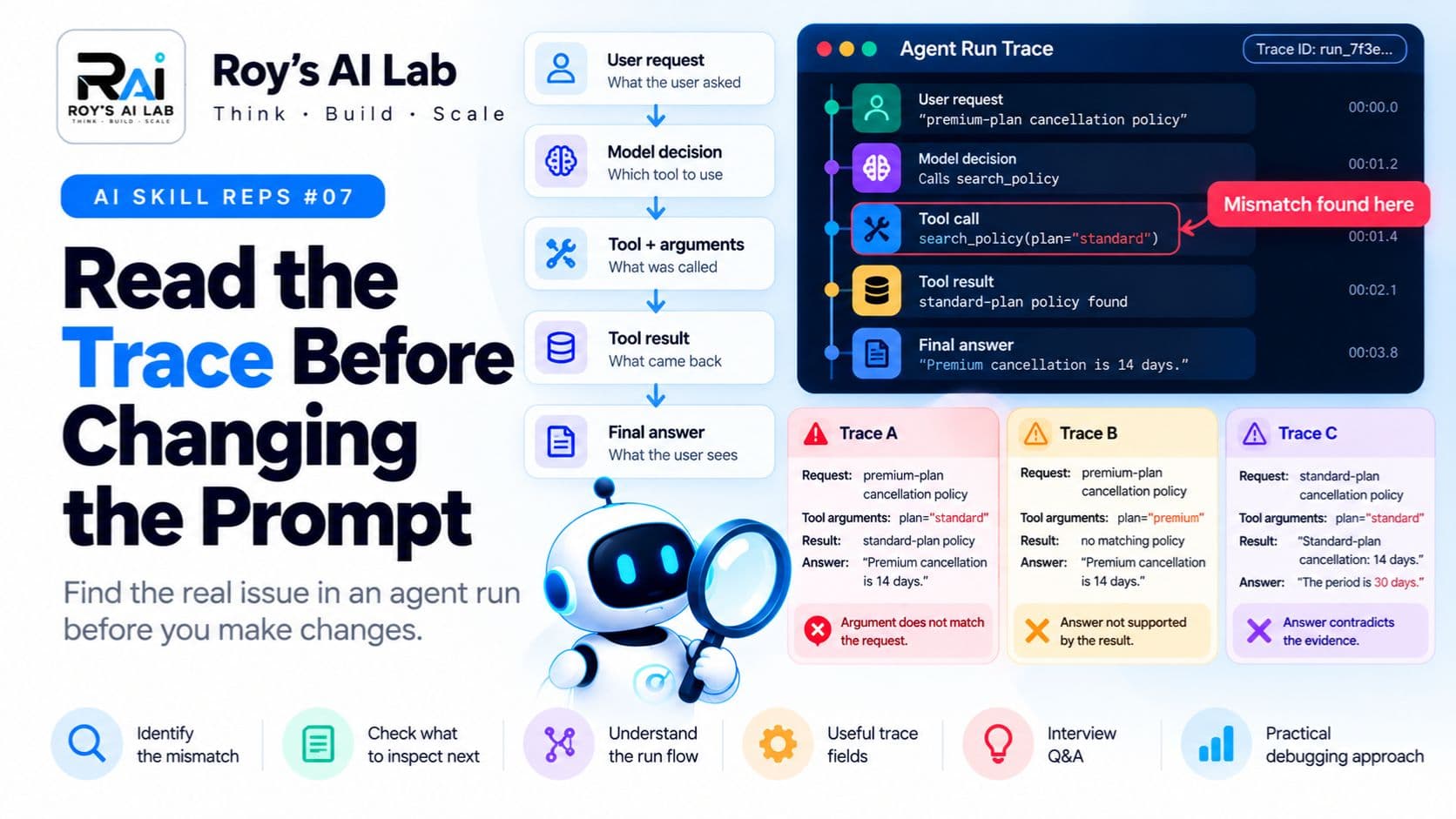
Quick answer
- Read the agent's trace before you rewrite the prompt.
- Find the first visible mismatch between what happened and what should have happened.
- Change one thing, test it, and check whether the failure goes away.
Your agent just gave a wrong answer. What do you do next?
Most people open the prompt and start rewriting. A new sentence here, a stern warning there, a few extra examples. Sometimes it works. Often it just hides the real problem and creates new ones.
There's a better first step: read the trace.
A trace is a record of everything the agent did during one run. It shows what the model decided, which tools it called, what arguments it used, what came back, and what it finally said. Reading it tells you where things went wrong, so you fix the right thing.
Why read this? Because learning to read a trace is one of the fastest ways to stop guessing and start debugging. It's also a very practical skill to explain in an interview.
Follow the run
Think of a trace like the receipt and camera footage of a single visit to a shop. The final answer tells you the outcome. The trace shows how it happened.
A simple run looks like this:
User request
     ↓
Model decision
     ↓
Tool and arguments
     ↓
Tool result
     ↓
Final answer
Each step is a place where things can go right or wrong. Your job is to find the first place where the record stops matching what should have happened.
Your turn: three traces
Here are three short traces. For each one, try writing three things:
- First visible mismatch: where does the record first stop making sense?
- Next thing I would inspect: what would you look at next?
- What I cannot conclude yet: what can't you prove from this trace alone?
Trace A
Request: premium-plan cancellation policy
Tool arguments: plan="standard"
Result: standard-plan policy
Answer: "Premium cancellation is 14 days."
Trace B
Request: premium-plan cancellation policy
Tool arguments: plan="premium"
Result: no matching policy
Answer: "Premium cancellation is 14 days."
Trace C
Request: standard-plan cancellation policy
Tool arguments: plan="standard"
Result: "Standard-plan cancellation: 14 days."
Answer: "The period is 30 days."
Try all three before reading on. Then check your answers below.
Check your thinking
Trace A. The tool was called with the wrong plan. The user asked about premium, but the agent searched for standard. That's the first visible mismatch. Next, inspect how the arguments were built, what context the agent had, and how the tool is described. The trace shows the wrong argument. It doesn't tell you why the agent chose it.
Trace B. This one is trickier. The tool call matches the request, and the search found nothing. But the agent still gave a confident answer about premium cancellation. The mismatch is between the empty result and the answer. Next, check how the agent handles missing evidence. And remember that "no matching result" only means this search found nothing. It doesn't prove that no premium policy exists anywhere.
Trace C. Here the evidence says 14 days, but the answer says 30. Nothing about the tool call went wrong. The mismatch happened after the result came back. Next, look at the full input the model received, check for conflicting instructions in the context, and review how the answer was generated.
Notice that the three traces look similar on the surface, but each one needs a different investigation. Don't assume all three have the same fix.
What should you record?
A good trace makes debugging much easier. Useful fields often include:
- A run or request identifier, so you can find the right trace later.
- The sequence of operations, in order.
- The tool name and the arguments it received.
- The tool's status, such as success, empty or error.
- Where the information came from.
- Timings, so you can spot slow steps.
- The final outcome.
But be careful. Traces can hold personal or confidential information. Decide what you need for debugging, limit access, and don't log sensitive content just because it's easy to log.
The habit: find the first mismatch
When an agent fails, follow this habit:
- Find the first place where the trace stops matching what should have happened.
- Inspect that one step in detail.
- Make one change and test it.
- Check whether the same failure disappears, and whether anything new breaks.
This keeps you from changing five things at once and never knowing what helped. It also stops you from blaming the model for a problem that started with a bad tool argument.
Pause and think
Imagine you've found a mismatch in a trace and you fixed it. Your colleague asks, "So that's the cause, right?"
What's the honest answer?
A careful answer: "This is the first mismatch visible in the trace. I fixed it, and the failure went away in these test runs. But I haven't proven it explains every failure, so I'll keep checking other cases."
That answer is more useful than a confident claim, and it's what interviewers tend to respect.
A quick checklist
Before you change a prompt, ask yourself:
- Have I read the full trace, not just the final answer?
- Where is the first visible mismatch?
- Did the tool get the right arguments?
- Does the final answer match the evidence the agent actually received?
- Am I about to change one thing, and can I test it?
If you can't answer these, the prompt probably isn't the problem yet.
Interview follow-up
Interviewers often ask: "How do you know this is the root cause?"
Explain the process, not just the answer. Say that you found the first mismatch, inspected that step, made one change, and checked whether the behaviour changed. Then say what you still can't conclude from one trace.
A note on limits
Traces are only as good as what they record. If an important step or input is missing, the trace can mislead you. The examples here are fictional and simplified, to teach the reasoning. Real systems have more steps, more data and more ways to go wrong.
Keep learning
Want to connect this to the rest of agent design?
- Designing clear tool interfaces: https://roy-s-ai-lab.vercel.app/blog/your-agent-tool-interface-is-a-contract
- Why an agent shouldn't obey every instruction it reads: https://roy-s-ai-lab.vercel.app/blog/why-your-ai-agent-should-not-obey-every-instruction-it-reads
- Free AI agent interview answers: https://roy-s-ai-lab.vercel.app/interview-qa/AI%20Agents
- Full guides and scenario packs: https://roy-s-ai-lab.vercel.app/products
Try this: take one of the three traces above and explain, out loud, what you'd check first, in under one minute.
Sources
- OpenTelemetry, "Inside the LLM Call: GenAI Observability": https://opentelemetry.io/blog/2026/genai-observability/
- Anthropic, "Demystifying evals for AI agents": https://www.anthropic.com/engineering/demystifying-evals-for-ai-agents
The traces, worked answers and checklist are original teaching material.
Ritesh Rai
Keep reading
Read these next
- AI AgentsStored Is Not the Same as Remembered: How AI Agents Keep TrackMemory, task state and context explained, and why your agent sometimes forgets what mattersRead
- AI AgentsWhy Your AI Agent Should Not Obey Every Instruction It ReadsPrompt injection explained simply, and why a clear prompt is never enough on its ownRead
- AI AgentsDo You Need Multiple AI Agents? How to Know Before You BuildA practical way to decide whether a second agent helps, and how to prove itRead