 Roy's AI Lab
Faster Calls Don't Always Mean a Faster App (Here's How to Tell)
Where the time really goes in an AI app, and how to speed it up without hurting quality
31 October 2026 · Ritesh Rai
Quick answer
- Measure the whole request, not just the model call. Retrieval, tools and retries all add time.
- Output tokens usually drive latency most. Cutting the prompt helps much less than most people expect.
- Judge every speed or cost change by answer quality, not only by the dashboard number.
Your team swapped in a faster model. The model call now takes half the time. But the app still feels slow, and the monthly bill didn't drop as much as you hoped.
What happened? The model was never the whole story.
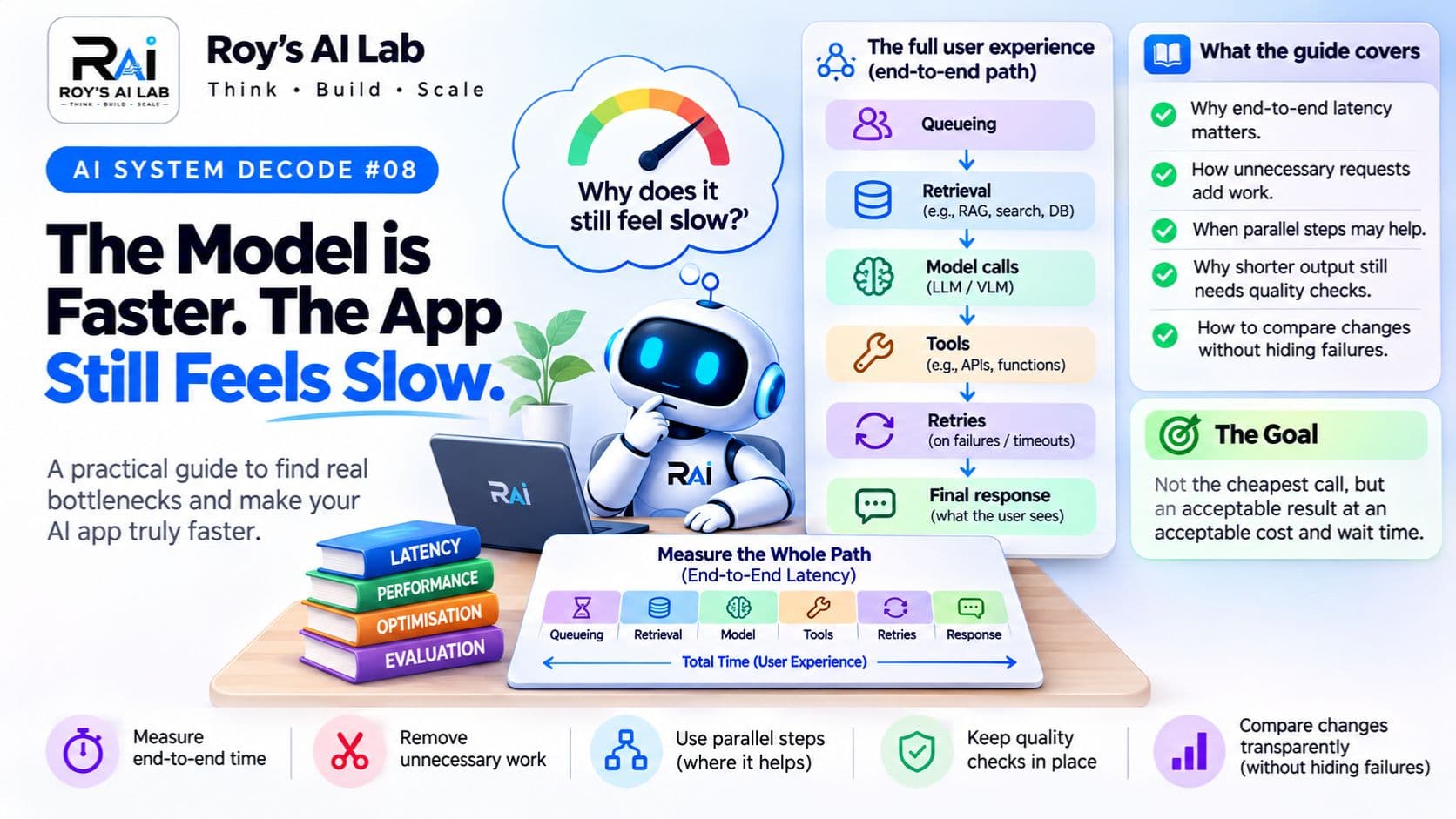
A single user request can pass through search, a few model calls, a tool call, a retry, and finally the response. If you only time the model, you're optimising one piece of a longer chain. This post shows you how to see the full picture, decide what to change, and check that the change didn't damage the answers.
Why read this? Because almost every AI app has a speed or cost problem, and the fix people reach for first is often the wrong one. Interviewers also love to ask, "How would you make this faster?" A calm, measured answer stands out.
Follow the time
A request in an AI app often looks like this:
User request
     ↓
Queue and application work
     ↓
Retrieval
     ↓
Model call
     ↓
Tool execution
     ↓
Possible second model call
     ↓
Final response
Some of these steps can run at the same time. Others have to wait for the one before. The first job is to measure how long each step really takes. Don't guess. Many teams are surprised to find that the slow step isn't the one they assumed.
Our post on reading an agent trace explains how to record these steps so you can see where the time goes.
Five questions to ask
Where is the time spent? Record each stage separately. You might find that retrieval takes longer than the model call, or that retries quietly double the wait.
Is every request needed? A task can repeat the same search, or make a call that doesn't change the result. Removing waste is different from removing a check that protects quality. Be careful to tell them apart.
Can independent work run in parallel? Two steps that don't depend on each other can often overlap. Steps that depend on each other can't simply be run side by side without changing the design.
Is the output longer than it needs to be? Long answers take longer to generate. But a shorter answer is only an improvement if it still includes the information the user needs.
Does a cheaper option still do the job? Compare models and settings on real tasks. A lower price per call doesn't always mean a lower cost per useful answer.
What the numbers say
OpenAI's latency guide makes two points worth remembering. First, generating output is usually the slowest part of a model call. As a rough rule, cutting half of the output tokens may cut about half of the latency. Second, shortening the input has a much smaller effect. Cutting the prompt by half may improve latency by only 1 to 5%.
So if your app is slow, look at what the model writes before you spend days trimming the prompt. And be careful with rules of thumb. They're a starting point for testing, not a promise for your app.
A worked example: PolicyPal
PolicyPal is a fictional company-policy assistant. Its team notices that answers are slow. One possible design:
- Search the policy documents.
- Ask the model to write a long internal summary.
- Ask the model to write a short answer from that summary.
Is step 2 needed? Maybe it adds useful checks. Or maybe the short answer could be written straight from the selected evidence, with the same quality and one fewer call.
That's a hypothesis to test, not a rule to apply everywhere. Some tasks need the intermediate step. The point is to find out, not to assume.
Try this first
Here are two ways to run the same task:
- Configuration A is cheaper for each call, but it often needs a second attempt because the first answer misses something.
- Configuration B costs more for each call, but it gets the task right the first time.
Which one is cheaper overall?
Before reading on, make a guess and write it down.
The answer: you can't tell from the price per call. Add up the work needed to reach an acceptable answer. If A needs two attempts on average, its real cost can be higher than B's, and it also takes longer. Always compare cost per successful outcome, not cost per call.
Pause and think: is streaming a fix?
Streaming lets the user see text appear sooner. That can make an app feel much faster.
But it doesn't necessarily reduce the total time to finish the task. The full work still happens. So streaming improves how fast the app feels, which is valuable, but it doesn't replace real speed improvements.
Ask yourself: "Am I making the app faster, or making the wait feel shorter?" Both can matter, but they're not the same thing, and you should know which one you're doing.
Compare fairly
To decide whether a change helps, follow the same steps you'd use for any experiment:
- Pick a set of realistic tasks.
- Run the current setup and the proposed one on the same tasks.
- Record the answer quality, the stage timings, the number of calls and retries, and the estimated cost.
- Look at slow and failed runs too, not just the average. Averages can hide bad experiences.
Decide what "good enough" means before you look at the results. Otherwise, it's easy to find a number that makes any change look like a win.
A quick checklist
Before you optimise an AI app, ask yourself:
- Have I timed every stage, not only the model call?
- Do I know which step takes the longest?
- Am I removing waste, or removing a check that protects quality?
- Have I compared cost per successful answer, not cost per call?
- Did I test the change on real tasks, including the slow and failed ones?
Interview follow-up
"How would you make this AI feature faster?"
A strong answer doesn't start with a model name. It starts with: "I'd measure each stage first, find the slowest one, then decide whether the work is necessary. I'd compare options on the same tasks and judge them by cost per successful answer, with quality as a hard requirement."
That answer shows you think about the whole system, which is what interviewers are really testing.
A note on limits
The figures above come from OpenAI's guidance and are rough rules, not guarantees. Real results depend on your model, your tools, your data and your traffic. No benchmark was run for this post, and the PolicyPal example is fictional.
Keep learning
Want to connect this to the rest of your AI system skills?
- Read the trace before changing the prompt: https://roy-s-ai-lab.vercel.app/blog/read-the-agent-trace-before-changing-the-prompt
- Design the problem before choosing the stack: https://roy-s-ai-lab.vercel.app/blog/design-the-problem-before-choosing-the-stack
- Free RAG practice sets: https://roy-s-ai-lab.vercel.app/topics/rag
- Full guides and scenario packs: https://roy-s-ai-lab.vercel.app/products
Try this: pick any AI app you've used. Write down the steps you think it runs before it answers, then guess which step is slowest. Then check your guess.
Sources
- OpenAI, "Latency optimization": https://developers.openai.com/api/docs/guides/latency-optimization
- OpenAI, "Cost optimization": https://developers.openai.com/api/docs/guides/cost-optimization
- OpenTelemetry, "Inside the LLM Call: GenAI Observability with OpenTelemetry": https://opentelemetry.io/blog/2026/genai-observability/
The PolicyPal example, the comparison exercise and the checklist are original teaching material.
Ritesh Rai
Keep reading
Read these next
- AI ApplicationsEvaluate the Judge, Too: Can You Trust an AI Grader?How to test a model-based grader for bias, blind spots and hidden mistakesRead
- AI ApplicationsPrompt Caching Is Not Answer Caching: What Your AI App Is Really ReusingWhat gets reused, why an exact match matters, and how to prove it actually saves moneyRead
- AI ApplicationsDesign the Problem Before You Choose the StackHow to turn a vague request into a clear plan you can defend in an interviewRead